Today I'm going to show you how to create a simple "Hello World...!" program using Geany IDE.
Following is the video of the hello world code.
Step 1 (Open Geany IDE)
Open your Geany IDE it will look like the following picture as you open your Geany IDE for the first time.

Step 2 (Create a new file on Geany)
Click On "New" and open a new file


Step 3 (Save created file)
Save newly open "Untitled" file as "Demo.java"

Go to desktop, create a new folder, name it as "My Java Program"

Go inside that folder, Type name as "Demo.java" and click "save"

Step 4
Then it will look like this

Step 5 (Write "Hello World...!" on Geany)
Now you can start writing your Java program on "Demo.java" file,

Write actually same code as I have shown above
Step 6 (Compile and Run "Hello World...!" using Geany)
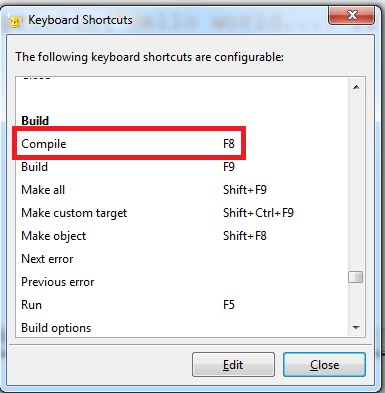
To compile our code we can click on the "Compile" button or you can press "F8" key


After you compile your code, Geany IDE will show you a message,
If your code compiles correctly,

If your code has some errors,

( If you guys can find the error please comment it below ).
If your code compiles successfully, now you can run your program, to run your program again you can click on the "Run" button or you can press the "F5" key.


After you run your compiled code Terminal will open and run your code,

